
Case Review: How Trimble Connect Scheduling Turns Live Jobsite Data Into Schedule Decisions
A typical jobsite keeps only about half of its active work on plan in any given week, and most of that drift is noticed after it has already moved a milestone. That is the gap Trimble put in front of contractors on the Trimble Dimensions User Conference stage: Trimble Connect Scheduling is an agentic-AI capability inside Trimble Connect that reads live project data, rates schedule risk and proposes adjustments people review before anything is applied.
This review is written for schedulers, project managers and operations leads who have to decide whether to wire such an engine into a job already running in Primavera P6 or MS Project. Where Trimble has published no numbers, I say so, and I mark my own reading as analysis.
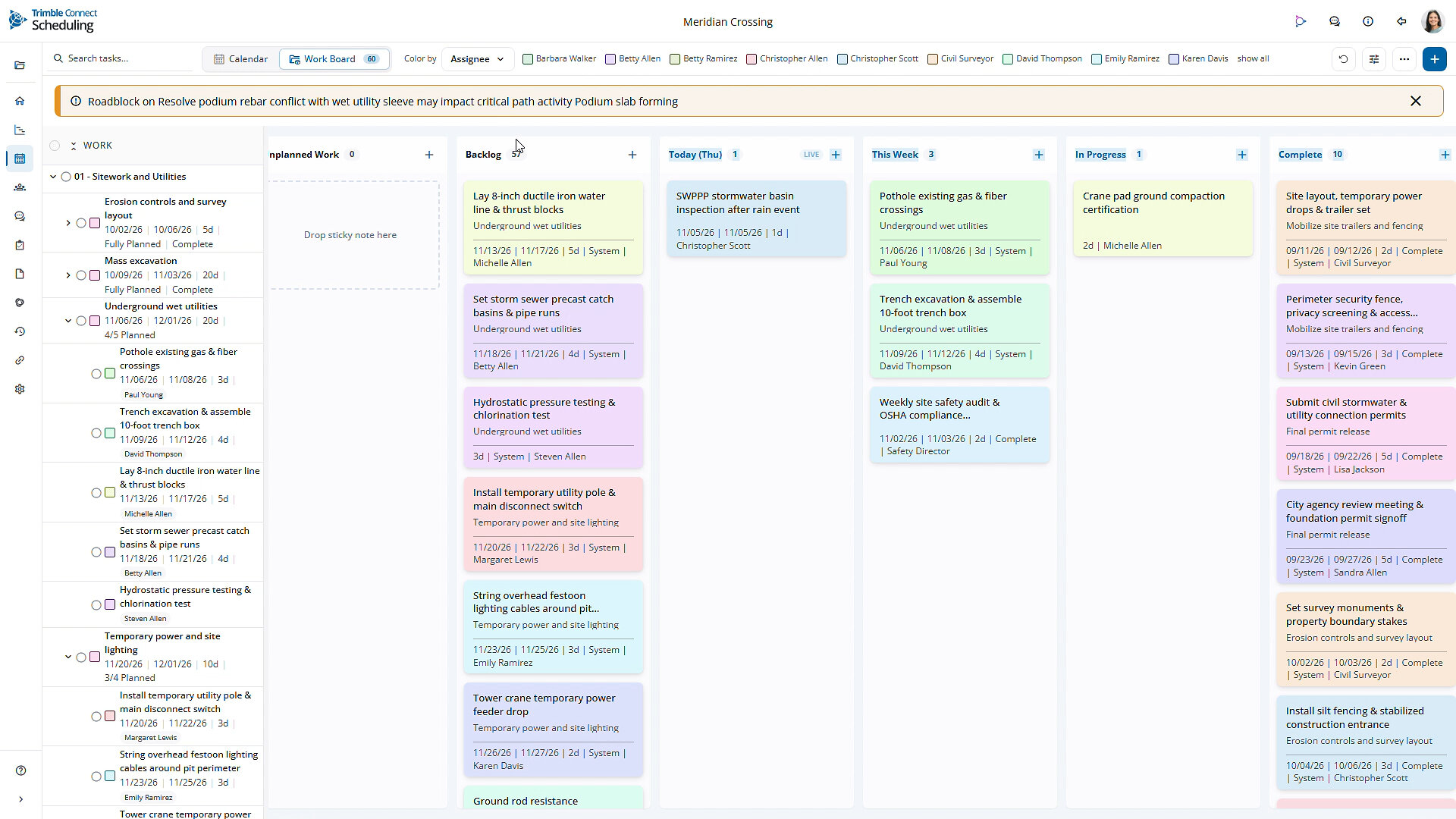
Why does a schedule drift before anyone decides anything?
Because the inputs move daily and the plan gets re-read weekly at best. Crew availability, late deliveries, change orders, equipment issues, weather and other disruptions keep rewriting the real work, while the master schedule sits where it was last updated. Many office and field teams still coordinate across separate tools - spreadsheets, whiteboards, email and text messages - and those fragmented workflows produce version mismatches and push early risk identification further back.
The scale of the drift is measurable, not folklore. McKinsey's construction productivity research estimates that 98 percent of megaprojects carry cost overruns above 30 percent and that 77 percent run at least 40 percent late. Buildots' Intelligence Lab analysis of more than 200 construction projects reports an average schedule adherence index of 48 percent, meaning roughly half of ongoing activities are off their planned dates in a typical week; its 2026 global report puts the share of activities staying on schedule at 52.8 percent, with close to 40 percent of committed weekly work not delivered.
My diagnosis: the failure is rarely the network logic itself. It is detection latency - the interval between an RFI going stale and that staleness reaching the Gantt chart, and between a rain window showing up in a forecast and anyone resequencing the work that depends on it. A planning engine that re-reads project data continuously attacks latency, not the critical path method. (Analysis.)
What does the planning engine actually read, and what does it propose?
Autonomously reviewing multiple data sources, the capability helps teams detect risk and optimize a centralized schedule in real time. It links the master schedule with live project data: look-aheads, RFIs, weather forecasts, daily reports and submittals. On the Trimble Connect platform, the agentic planning engine sits natively inside the environment and pulls from the Trimble Connect common data environment plus Trimble Connect Project Management data, then compares current information with historical operational data and patterns to flag risk and suggest responses such as float use or activity resequencing. Suggestions go out for review before they are applied.
| Signal the engine watches | Where it comes from | Decision it unlocks | Metric to watch |
|---|---|---|---|
| An RFI still open past its response date | RFIs and BCF topics in the Trimble Connect common data environment | Resequence successor activities or consume float before the constraint becomes a claim | RFI aging, days-to-close |
| A rain window inside the look-ahead horizon | Weather forecasts tied to the schedule | Move weather-sensitive tasks, protect indoor work | Standby hours, weather-day utilization |
| An open submittal behind a procurement activity | Submittals and project records | Shift predecessor sequence instead of letting the installation date erode | Submittal cycle time, baseline variance |
| A field task slipping against the master plan | Look-ahead tasks linked to the master Gantt chart | Realign jobsite work and project-level tracking in one shared record | Schedule adherence index, percent plan complete |
| Absent crews or a late delivery | Daily reports and field updates | Reallocate float, resequence, escalate early | Committed-work completion rate |
| An imported network with broken logic | Schedules imported from Primavera P6 or MS Project, or built natively | Risk recalculation without disturbing logic or baselines | Negative float count, open-end count |
Two other design points matter in practice. Contractors can build and revise schedules in Trimble Connect Scheduling or import schedules from Primavera P6, MS Project and other tools while preserving logic and baselines - so the master schedule of record does not have to move. And field leaders, project managers, schedulers, estimators and executives review the same scheduling environment rather than parallel exports. A domain-specific model, trained on Trimble construction project data, is what produces the context-aware output. This launch is one slice of the broader design, build and operate AI work on the platform.
What did Over the past several months of contractor use actually prove?
Contractor input shaped the development of the tool: Over the past several months, contractors used the system to support schedule organization and communication. That is qualitative validation, and it is honest to say so - no before-and-after adherence figures, float savings or milestone-pull-in numbers have been published with the launch. Anyone building an internal business case right now is working with a mechanism, not a measured result.
The closest quantified automation case Trimble has put on record sits in another product line: at its 2026 fleet and transportation event, the company reported that AI invoice scanning in TMT Fleet Maintenance saved more than 136,000 minutes across 19,500 supplier PDF invoices compared with manual data entry, mapping repairs to VMRS codes so shops could clear trucks faster. Treat that as the shape of the argument, not the proof: invoice scanning removes typing from a fixed process, whereas scheduling agents have to touch judgment calls that carry contractual weight. Related coverage of the agentic planning engine is explicit that the agent proposes float and sequencing fixes while teams must approve changes before they proceed - the approval gate is a product design choice, and it is also the reason an owner's change-order process still governs what a resequence actually means. The same metered pattern shows up in agentic AI programs far outside construction, and in manufacturing order-to-cash redesigns.
What has to be true before this engine is worth turning on?
Four conditions, in order of how often they break.
- Baseline hygiene first. Continuous risk calculation is only as good as the network it recalculates. The DCMA 14-point assessment, summarized in the US Government Accountability Office's schedule assessment guide, sets the conventional quality gates schedulers use: no negative float, no more than about 5 percent of activities missing predecessors or successors, at least 90 percent finish-to-start relationships, hard constraints under 5 percent, and durations and float values inside sane ranges. Run those checks before trusting a machine-suggested resequence.
- Data currency. The engine reads daily reports, RFIs, submittals and look-aheads. If the field logs those in a phone and a spreadsheet, the centralized schedule is reading yesterday. Ask who files what, and how fast.
- An approval policy with a clock. Suggestions that wait three days in a queue are worse than no suggestions, because the float they were protecting is gone. Name one accountable approver per zone and set a 24-hour disposition target.
- A metrics baseline. Decide the two numbers you will report monthly before go-live. I would take schedule adherence - Lean construction's percent plan complete is the practical field proxy, and teams generally treat roughly 70 percent or better as reliable, against a measured industry average near 48 to 60 percent - plus RFI aging and negative-float count as leading indicators.
Where the fit is strongest, in my reading: general contractors in North America running multi-trade jobs with weather-exposed sitework, imported Primavera P6 networks and a real weekly look-ahead discipline. Where it is weakest: single-trade subcontractors with no common data environment, projects whose baselines were never maintained, and jobs where schedule authority sits with the owner's claims team rather than the project. Availability as announced covers general contractors and subcontractors across construction sectors in North America; details are published at trimble.com.
Four misconceptions I would argue against
- "The AI rewrites my schedule." It suggests; adjustments go out for review before they are applied. The scheduler's job changes from hand-editing dates to adjudicating proposals.
- "Importing from Primavera P6 fixes my planning." Import preserves logic and baselines, and preserves bad logic just as faithfully. Hygiene is a human step.
- "Better prediction means fewer meetings." In practice a live risk feed shortens the cycle and makes the weekly commitment meeting more confrontational, not redundant.
- "Float is a cushion." Under a contract, float is an asset with an owner. Automated resequencing does not change who gets to spend it.
FAQ: what readers ask before piloting
Does Trimble Connect Scheduling work with schedules I already maintain in Primavera P6 or MS Project?
Yes. Contractors can build and revise schedules inside Trimble Connect Scheduling or import schedules from Primavera P6, MS Project and other tools while preserving logic and baselines.
Can it reschedule the project without anyone approving it?
No. With agentic AI, it monitors changing conditions, assesses risk and suggests schedule adjustments for review before they are applied.
Is it available outside North America?
Announced availability covers general contractors and subcontractors across construction sectors in North America. Nothing has been published about wider regions; confirm current scope at trimble.com.
What should a pilot prove in 90 days?
Three things: a rise in schedule adherence or percent plan complete against your own baseline, a shorter RFI aging tail, and fewer negative-float activities. If only the software usage report improves, the pilot failed - that is analysis, not a vendor claim.
Who owns it, the scheduler or the project manager?
In the workflows I have seen work, the scheduler owns the network and the project manager owns the disposition of proposals, because proposals are commitments crews act on. Split them and the suggestions stop being trusted.
A rollout framework you can copy
Step one, measure before you buy the argument: take a 48 percent adherence baseline seriously as a starting point and record your own for two weeks. Step two, clean the network against a DCMA-style check and stop treating imported logic as automatically valid. Step three, connect the data the engine needs - daily reports, RFIs, submittals, look-aheads - and name the person who files them. Step four, run one zone of one job for 90 days with a 24-hour approval clock, then judge it on adherence, RFI aging and negative float, not on how the dashboard looks. The tooling is the easy part; the discipline around it is where the schedule either holds or does not.
Sources
- McKinsey & Company, "The construction productivity imperative" - megaproject overrun and delay estimates: https://www.mckinsey.com/~/media/McKinsey/Industries/Capital%20Projects%20and%20Infrastructure/Our%20Insights/The%20construction%20productivity%20imperative/The%20construction%20productivity%20imperative.pdf
- Buildots Intelligence Lab schedule adherence analysis across more than 200 projects: https://buildots.com/lab/resources/schedule-adherence-construction-benchmarks/
- Buildots Intelligence Lab global report via PR Newswire (52.8 percent of activities on schedule; close to 40 percent of weekly commitments not delivered): https://www.prnewswire.com/il/news-releases/nearly-40-of-planned-weekly-work-on-construction-sites-isnt-delivered-new-buildots-intelligence-lab-global-benchmarks-report-302902316.html
- US Government Accountability Office, "Schedule Assessment Guide" (DCMA 14-point assessment): https://www.gao.gov/assets/690/687052.pdf
- Unite.AI coverage of Trimble's agentic scheduling engine and the human approval gate: https://www.unite.ai/trimble-expands-connect-with-construction-ai-and-agentic-scheduling/
- Unite.AI coverage of Trimble's 2026 fleet event, including the AI invoice scanning figures: https://www.unite.ai/zh-cn/trimble-unveils-autonomous-ai-agent-ready-fleet-tools-at-insight-2026/
- Trimble product and launch newsroom: https://news.trimble.com/ and trimble.com